


Conditional Use Permit Site Plan Details
A conditional use permit review asks a practical question: can the proposed use operate on this property without creating unreasonable effects for nearby people, streets, or services? A clear site plan helps reviewers answer that question by showing the property layout, access, parking, buffers, proposed activity areas, and surrounding context in one easy-to-read document.
Order your conditional use permit site plan online and give your planning department a clear layout to review.
A conditional use permit allows a use that may be appropriate in a zoning district only after local review and approval of specific conditions. The site plan supports that review by showing where the proposed use will occur, how people and vehicles reach it, and how the layout relates to neighboring properties.
Requirements vary by jurisdiction and project. Before ordering a plan, ask the local planning department for its current application checklist and confirm whether additional reports are needed. This article explains common layout details and is not legal advice.
What is a conditional use permit?
A conditional use permit, often called a CUP, is local approval for a land use that is not automatically allowed by right but may be acceptable when it meets stated conditions. The review typically focuses on compatibility, access, parking, operating impacts, and the relationship between the proposal and surrounding properties.
Why local agencies use conditions
Zoning districts usually list uses that are allowed by right and uses that need individual review. A use that works well on one property might create traffic, noise, lighting, or access concerns on another. A CUP process lets planning staff and a hearing body evaluate those site-specific facts before deciding.
If approved, the decision may include conditions related to operating hours, parking, screening, lighting, access, or the placement of outdoor activities. Those conditions become important project constraints, so the application materials should clearly match what the applicant intends to build and operate.
How the site plan supports the review
The site plan connects the written proposal to a physical location. Reviewers can use it to see distances, relationships, circulation routes, and proposed use areas. It does not replace every application document, but it gives planning staff a shared visual reference when evaluating the request.
My Site Plan prepares remote online site plans for permits without requiring a site visit. Customers provide the property address, project details, and local checklist so the drafting team can focus on the layout information the reviewer needs.
Why property layout matters during review
Property layout matters because a conditional use decision depends on how the proposal fits its actual setting. Reviewers need to understand where the use will happen, how close it is to neighboring lots, where vehicles and people will move, and which layout features may reduce potential impacts.
Existing and proposed features
A useful plan distinguishes existing features from proposed changes. Buildings, fences, driveways, parking areas, trees, utility locations, and outdoor activity areas should be labeled clearly when the local checklist requests them. This separation helps reviewers understand what already exists and what approval would change.
Property boundaries, dimensions, and setbacks
Boundaries and key dimensions establish the frame for the entire review. Setback lines can help staff assess whether structures and activity areas meet local zoning rules. Applicants should confirm the required dimensions with their planning department, especially when a project includes new construction or expanded outdoor use.
Readable labels and a clear legend
A crowded drawing can slow review even when it contains the right information. Labels should be specific, consistent, and placed close to the related feature. A legend can separate existing and proposed elements and explain line types or symbols. The goal is to help a reviewer find essential facts quickly.
Conditional use permit site plan checklist
A strong conditional use permit site plan typically combines core property facts with the project-specific details requested by the local agency. Use the checklist below as a preparation guide, then compare it with the official application requirements before submitting your package.
- Property boundaries, lot dimensions, and the north direction
- Existing and proposed buildings or structures
- Required setbacks and distances between key features
- Driveways, street connections, and internal vehicle routes
- Parking stalls, accessible spaces, loading areas, and drop-off areas
- Sidewalks, pedestrian paths, and emergency access routes
- Outdoor activity, storage, service, and waste areas
- Fences, walls, landscaping, and screening buffers
- Adjacent streets, lots, and relevant neighboring uses
- Clear labels that distinguish existing conditions from proposed work
Some applications also request a project narrative, operating schedule, landscape details, lighting information, drainage documents, or traffic information. Ask planning staff which items apply to your project before finalizing the layout.
Need to compare service levels first? Review My Site Plan's transparent site plan pricing, then choose the plan that fits your filing requirements.
How should access and parking appear?
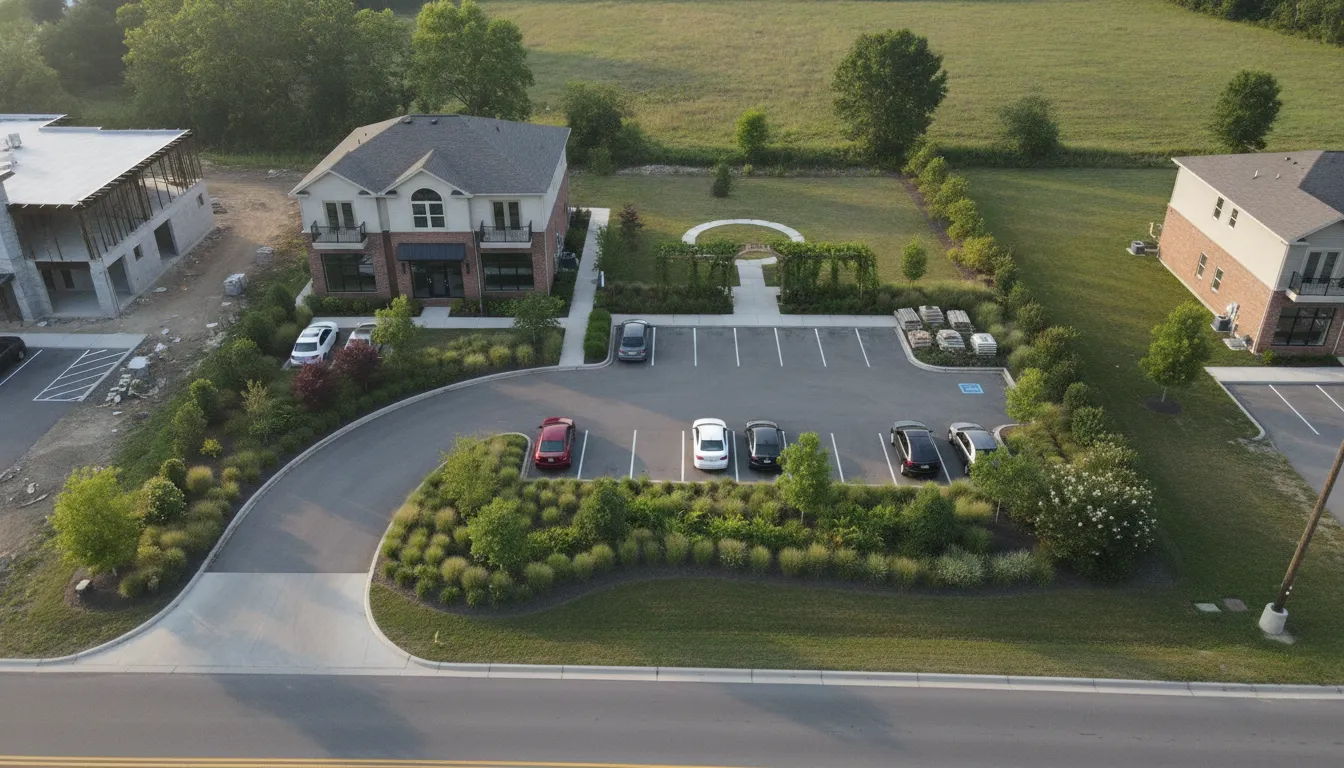
Access and parking should be shown as a connected circulation system, not as isolated features. A reviewer should be able to trace how vehicles enter from the street, move through the property, park or load, turn around, and leave without conflicting with pedestrians or emergency routes.
Driveways and street connections
Show each driveway and the street or alley it connects to. When requested, include driveway width, curb locations, gates, and nearby intersections. A clear connection between the public street and the internal layout helps staff review traffic movement and potential conflicts.
Parking, loading, and drop-off zones
Mark individual parking stalls and label loading or drop-off zones. If the local checklist specifies accessible spaces, bicycle parking, or a required stall count, include those details. For commercial properties, a commercial detailed site plan can provide a useful level of layout detail for these areas.
Pedestrian and emergency routes
Sidewalks and paths should connect parking areas to entrances where applicable. The layout may also need to show emergency access lanes, gates, or turning areas. Confirm the relevant requirements with planning staff and the responding agency before submission.
Show adjacent context and proposed use areas
Adjacent context helps reviewers judge compatibility. The plan should identify the proposal's position relative to neighboring lots, streets, and relevant nearby uses. It should also define where the proposed activity will occur so reviewers can evaluate potential effects and possible conditions.
Neighboring lots and streets
Show the streets serving the property and the lots that directly border it when requested. Note shared driveways, alleys, or other connections that affect access. If neighboring land uses are relevant to the application, labeling them can help staff understand why buffers or operating conditions may be appropriate.
Outdoor activity and service areas
Clearly identify outdoor seating, storage, loading, waste, equipment, or customer activity areas. Their location can matter as much as their size. Placing an activity area away from a shared property line or behind a buffer may help address concerns before the hearing.
Buffers, fences, and landscaping
Fences, walls, and landscaping can separate different uses and reduce visual or operational impacts. Show the location and extent of proposed screening, then confirm whether the planning department requires a separate landscape plan or specific planting information.
What supporting documents may be requested?
A conditional use permit application commonly includes more than a site plan. Depending on the proposal and local rules, the agency may request a narrative, application form, ownership authorization, operating details, landscape or lighting information, and technical reports from the appropriate professionals.
| Document | What it helps explain | When to confirm it |
|---|---|---|
| Application form | Applicant, property, and request details | Before preparing the package |
| Project narrative | Proposed use, operations, and compatibility | Before pre-application review |
| Site plan | Physical layout and surrounding context | After receiving the local checklist |
| Operating schedule | Hours, staffing, deliveries, and activity | When operations affect review |
| Additional reports | Traffic, drainage, lighting, or other technical issues | When requested by the agency |
Start with a pre-application conversation
A short conversation with planning staff can prevent avoidable revisions. Bring a plain-language description of the proposed use, the property address, and any early layout ideas. Ask who makes the decision, which documents are mandatory, whether a public hearing is required, and how the agency wants files submitted.
Match the layout to the written narrative
The plan and narrative should describe the same proposal. If the narrative mentions outdoor storage, deliveries, customer parking, or a buffer, the plan should show where those items belong. Consistent materials make it easier for staff and hearing participants to understand the request.
How to prepare for a smoother review
A smoother review starts with a complete local checklist, a consistent project scope, and a readable plan. Confirm requirements early, prepare the requested information, review every label and dimension, and respond to staff questions promptly without changing the proposal informally between documents.
- Request the current checklist. Confirm submission format, review dates, fees, and hearing requirements.
- Define the proposed use. Document operating hours, customers, staff, deliveries, outdoor activities, and other relevant facts.
- Gather property information. Provide the address, existing layout details, project notes, and agency requirements to the drafting team.
- Review the draft against the checklist. Check every label, proposed feature, access route, parking area, and buffer.
- Submit a consistent package. Make sure the site plan, narrative, and supporting documents describe the same request.
- Address comments clearly. Track requested revisions and update all affected documents together.
My Site Plan can prepare the site plan portion remotely, often within 24 hours, with unlimited revisions and guaranteed acceptance where applicable. The service is designed to help homeowners, contractors, real estate professionals, and commercial property owners move through permit preparation efficiently.
Frequently asked questions
Does every conditional use permit application need a site plan?
Many applications require a site plan because the decision depends on the property's physical layout. Requirements vary, so ask the local planning department for the current checklist before ordering or submitting documents.
What details are most important on the plan?
Common priorities include property boundaries, existing and proposed structures, access, parking, activity areas, setbacks, buffers, and adjacent context. The local checklist is the final guide for your project.
Can conditions change the proposed layout?
Yes. Staff or the decision-making body may request layout changes or impose conditions related to access, parking, screening, lighting, or operations. Keep the plan consistent with the final approved scope.
How quickly can My Site Plan prepare the layout?
My Site Plan typically delivers remote online site plans in under 24 hours. Timing can depend on project complexity and the information provided. Unlimited revisions are available so requested layout updates can be addressed.
Get your conditional use permit site plan
A readable layout can help planning staff understand your request and focus the review on the facts that matter. Confirm the local requirements, gather your project information, and let My Site Plan turn those details into a clear remote online site plan. Before ordering, save the latest application checklist and mark each requested feature. That simple step gives the drafting team a clearer scope and makes your final review faster.
Ready to move forward? Order your conditional use permit site plan from My Site Plan for fast turnaround and unlimited revisions.

